
Aether
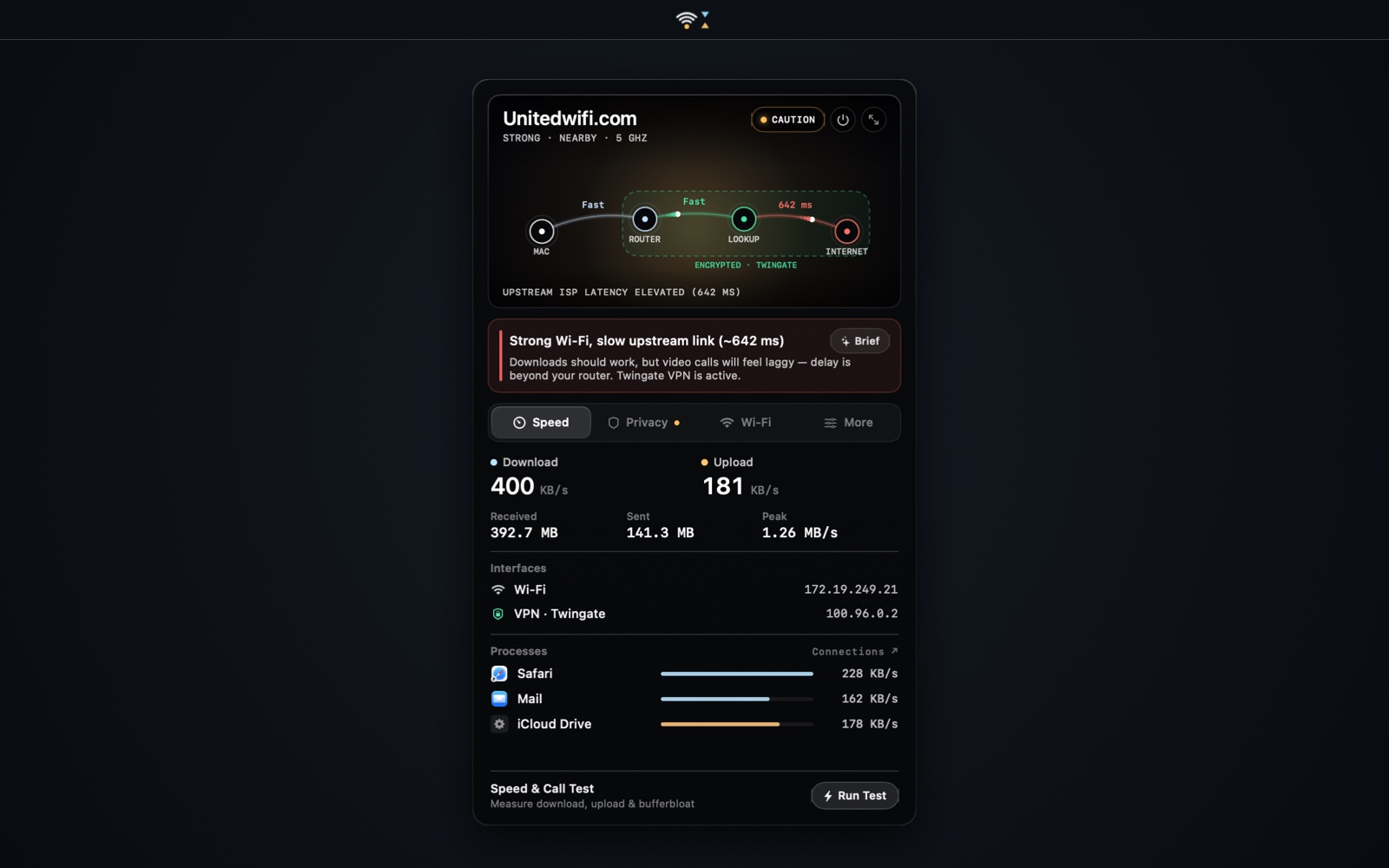
Aether answers the one question Apple’s Wi-Fi menu never can: why does my Wi-Fi feel slow right now? Open it from the menu bar and the first thing you see is a single grounded verdict—separating strong local Wi-Fi from a slow upstream link, crowded 2.4 GHz channel, or hotel sign-in page—directly beneath a live visual instrument that automatically leads with the 4-hop route circuit whenever something degrades. Written in pure Swift 6 with zero third-party packages, it unifies throughput, per-app bandwidth, RF spectrum, latency/jitter, LAN privacy, and optional on-device Apple Intelligence in one 3.4 MB panel.
git clone https://github.com/graemecode/aether.git && cd aether && ./scripts/build-app.sh --install
MIT open source · Zero third-party dependencies · 100% local telemetry · Apple Developer ID signed & notarized
Why Apple’s built-in Wi-Fi menu is outdated
macOS’s default Wi-Fi menu was designed in an era when the only question was “am I connected to a network?” Twenty years later, it still gives you three static arcs and a flat list of network names. Unless you know the secret Option-Click gesture—which dumps raw hexadecimal BSSIDs and opaque RSSI integers—macOS tells you almost nothing about the actual state of your connection.
When a video call stutters, a download crawls, or you join an airplane or café hotspot, the built-in menu can’t answer the questions you actually care about: Is the lag my Wi-Fi, my router, DNS lookup, or the ISP? Are three neighbors crowding my channel? Am I stuck on 2.4 GHz while a stronger 5 GHz node sits in the same room? Is an upload saturating the link and causing bufferbloat? Who else is on this network, and can they see my traffic?
Until now, Mac users who wanted those answers had to assemble a drawer of separate paid tools—WiFi Signal for radio stats, WiFi Explorer Pro for channel overlap, PingPlotter or PeakHour for jitter and drops, LanScan or Fing for subnet peers, iStat Menus for live throughput, and Terminal commands like networkQuality, scutil --dns, nettop, and lsof. I built Aether to unify all of them directly into the menu bar Wi-Fi icon itself, translating raw radio and kernel telemetry into plain English first while keeping full engineering depth one tap away.
- Native Swift 6 bundle
- 3.4 MB
- Closed idle CPU
- 0.0%
- Third-party SDKs
- 0
- License
- MIT
Every Wi-Fi tool you want, unified
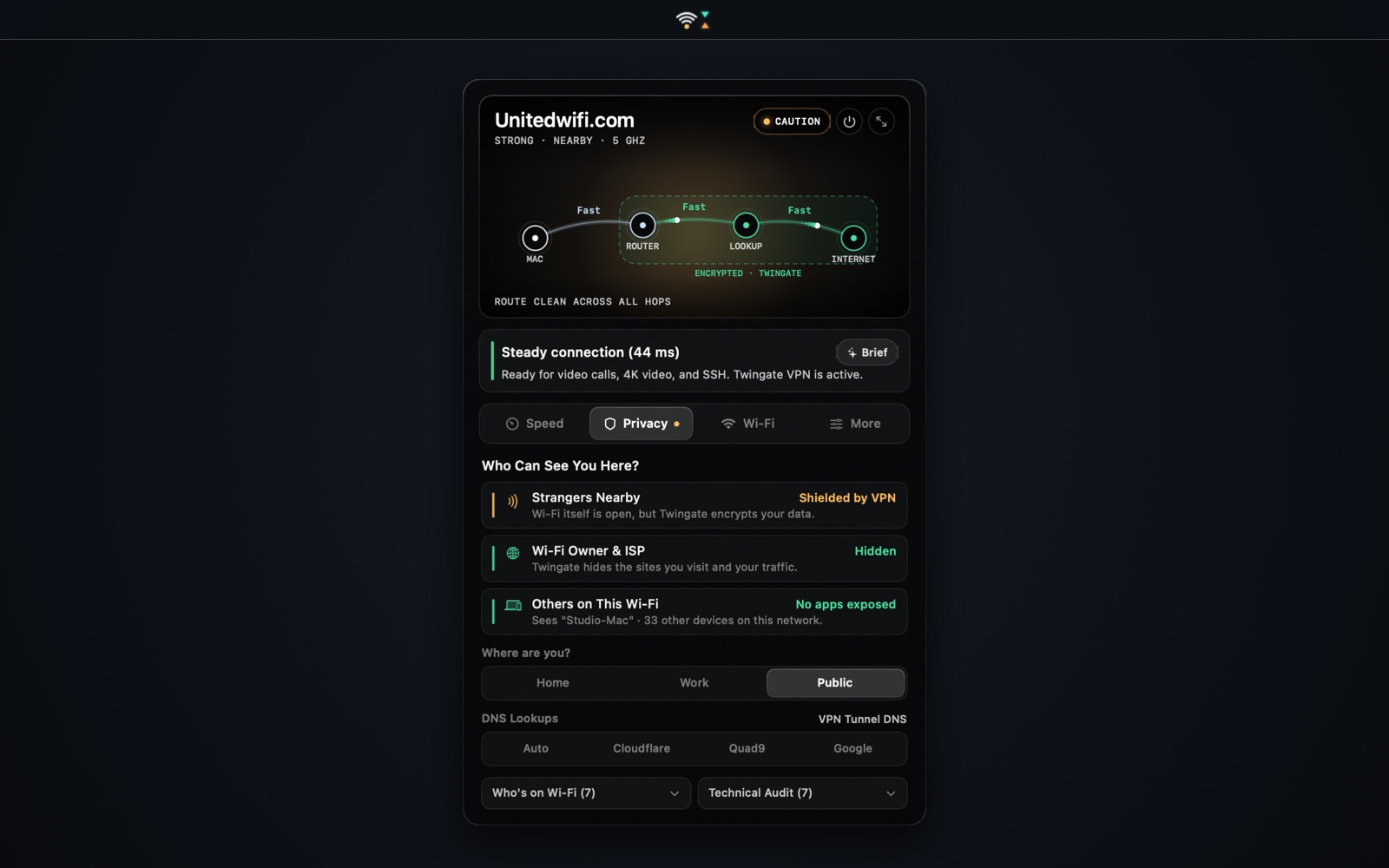
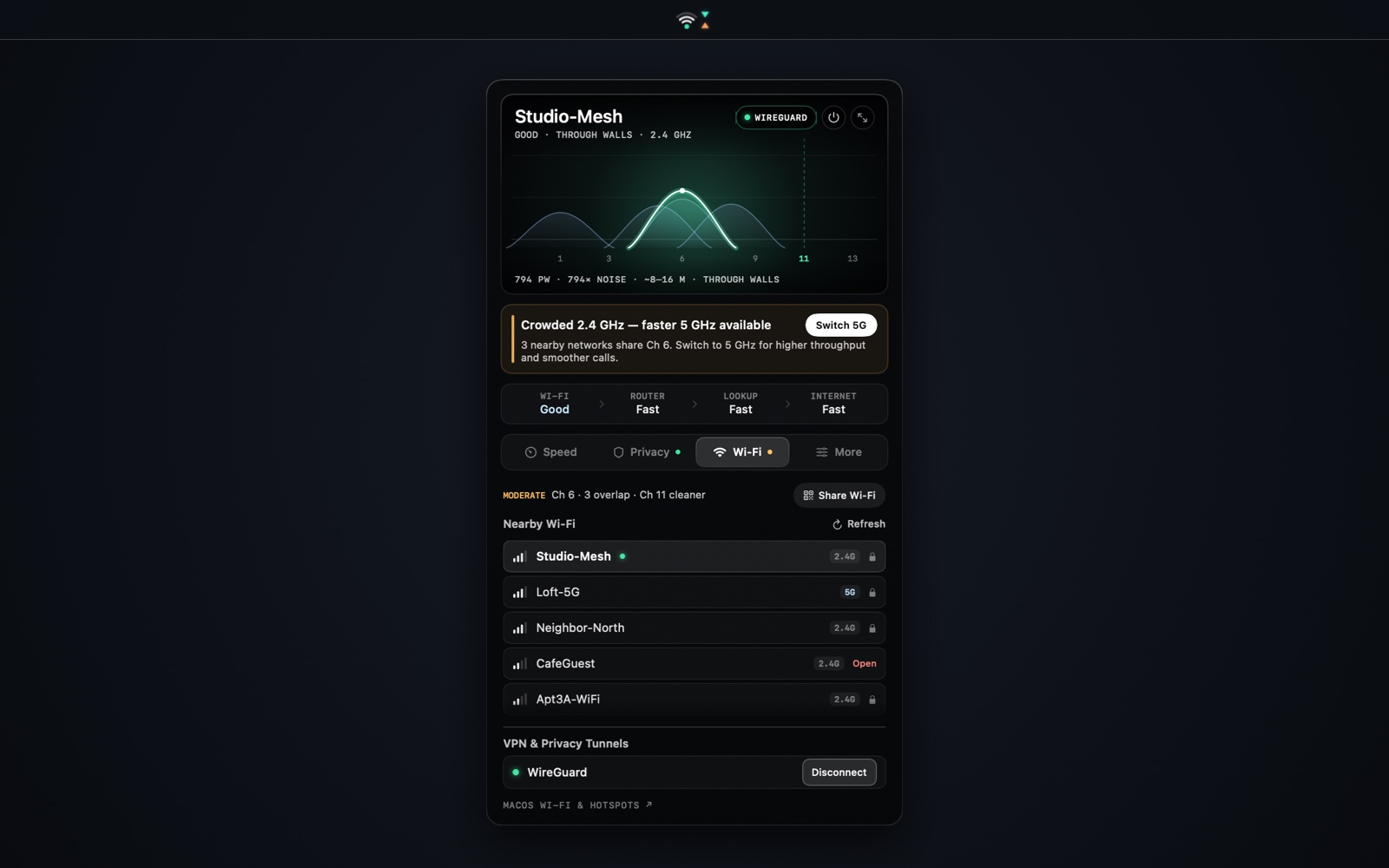
Instead of dumping 40 numbers into a noisy dashboard, Aether separates clarity from depth. At rest, it gives plain-English verdicts—Video Calls: Smooth, Strangers Nearby: Shielded by VPN, Your Mac is decoding 866M bits/sec from 25.1 billionths of a watt. Flip on Pro Mode (⌘P) or expand Aether Studio (⌘E) when you want raw dBm, BSSIDs, Gaussian channel curves, hover-crosshair jitter timelines, and OUI + mDNS LAN tables.
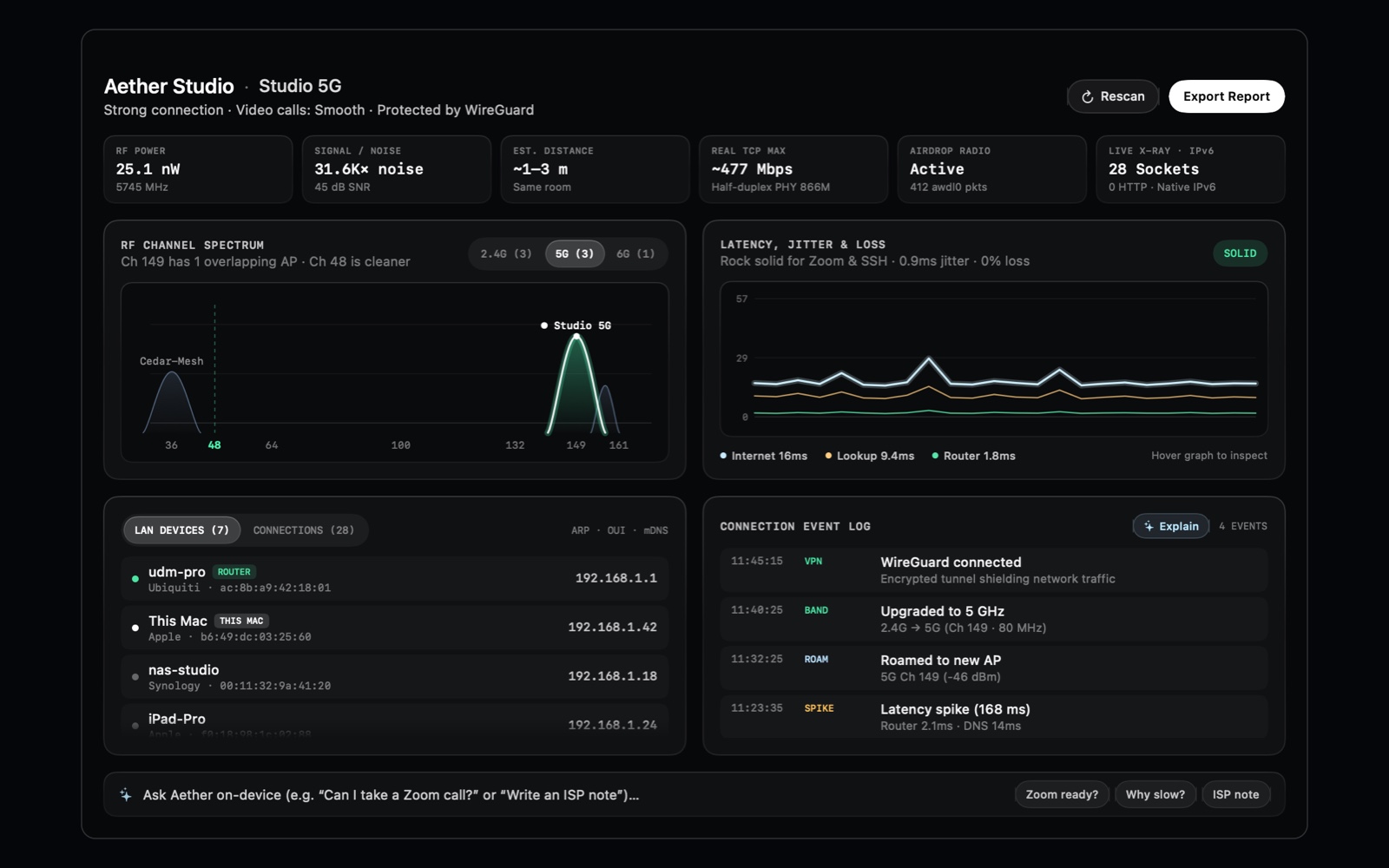
awdl0 AirDrop airtime radio, native IPv6), full-band RF spectrum, interactive hover-crosshair latency/jitter/loss timeline, OUI + mDNS LAN devices, live per-app outbound connections, event log with on-device ✦ Explain, and a quiet Ask Aether command bar.
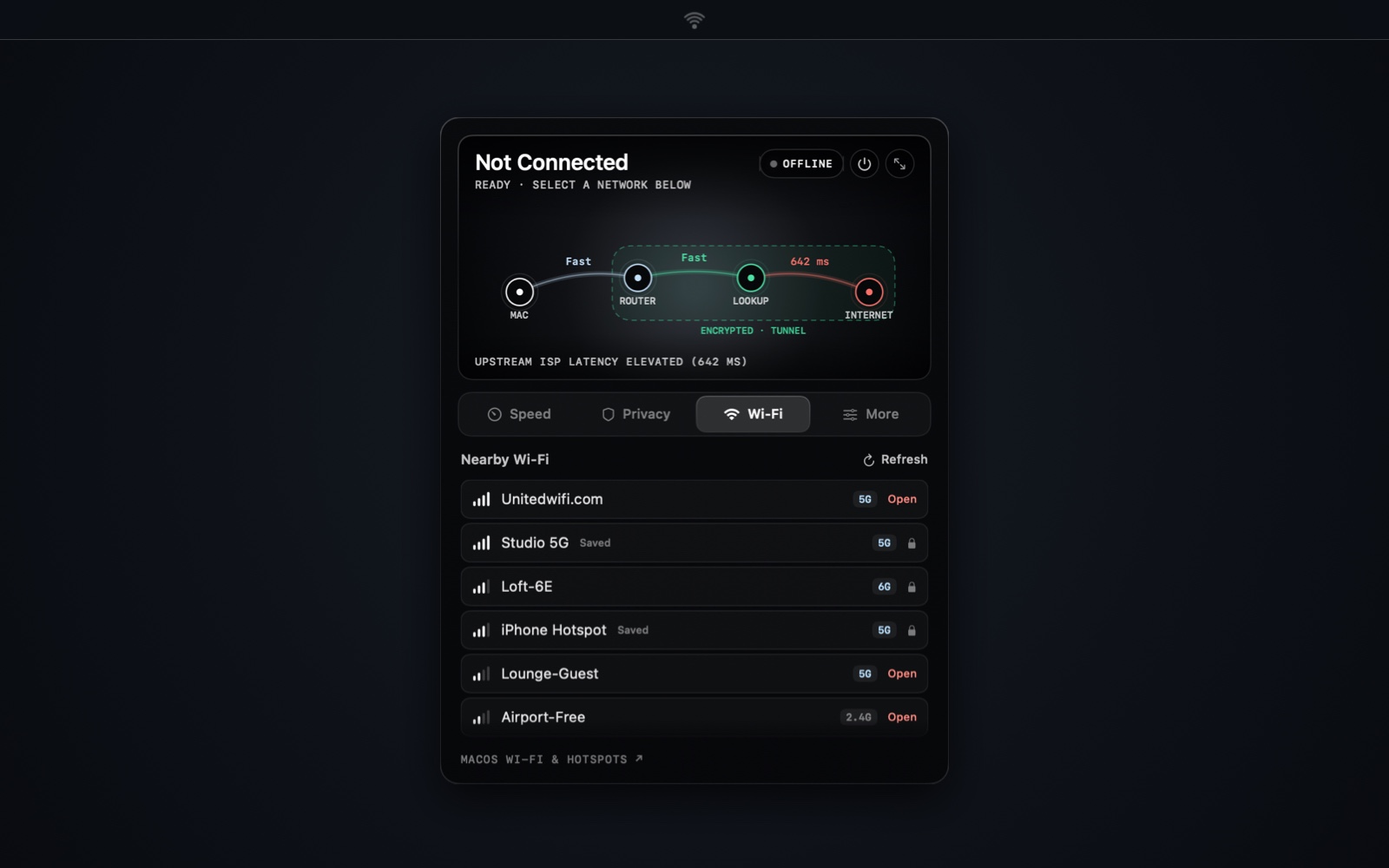
What Aether integrates
| What you used to need | How Aether integrates it natively | Overhead |
|---|---|---|
| iStat Menus / Pulse (network) | Fixed-width 28pt menu bar emblem with color-coded ▾ / ▴ speed arrows (or 22pt Icon / 50pt Speed), harmonic FLUX ribbons, Received / Sent / Peak, active Wi-Fi & VPN interfaces, and parent-grouped per-app bandwidth with real macOS icons via POSIX getifaddrs + proc_pidpath |
0 shift |
| WiFi Signal | Real-time RSSI, SNR, band/width, PHY generation, nanowatt radio power, linear SNR multiplier, path-loss distance, and half-duplex TCP ceiling | CoreWLAN |
| WiFi Explorer Pro | 2.4 / 5 / 6 GHz Gaussian channel overlap curves, congestion scoring, cleaner-channel recommendation, and 1-click sticky-client roaming | In-process |
| PingPlotter / PeakHour | Unspoofable 3-hop chain (native SOCK_DGRAM ICMP to router & one.one.one.one with TLS fallback—defeats airplane satellite TCP-PEPs and VPN SYN-ACK spoofing—plus getaddrinfo DNS) + rolling median jitter/loss timeline + bufferbloat test |
Native C |
| LanScan / Fing | Native Darwin sysctl (PF_ROUTE / RTF_LLINFO) ARP table + offline IEEE OUI vendor lookup + bounded concurrent mDNS reverse hostname resolution |
0 procs |
| Privacy, DNS & Portal Checks | 3-actor plain-English privacy posture, real over-the-air AF_LINK Private Wi-Fi Address check, Evil-Twin gateway MAC pinning, captive portal detection, system VPN toggles, and 1-click DNS presets |
Local only |
| On-Device Diagnostics | Strictly on-demand ✦ Brief, Studio event ✦ Explain, and Ask Aether Q&A powered by weak-linked Apple FoundationModels (macOS 26+) with grounded contradiction guards & instant deterministic fallback |
0 MB / Local |
How it’s built
Aether is written in pure Swift 6 with zero external dependencies—built directly on CoreWLAN, CoreLocation, SystemConfiguration, Network, ServiceManagement, Darwin POSIX sockets/sysctl, AppKit, and SwiftUI. All heavy telemetry pauses the instant the popover closes so idle background CPU stays at 0.0%.
Sources/
├── AetherCore/                           # Pure Swift 6 telemetry, RF physics & security engine
│   ├── InterfaceCounters.swift           # Zero-subprocess getifaddrs: live bytes, Peak, active IPs, MAC, awdl0, IPv6
│   ├── AppAttribution.swift              # Pure-Darwin proc_pidpath parent .app rollup & service port catalog
│   ├── NativeNetworkTelemetry.swift      # SCDynamicStore route/DNS/proxy, sysctl ARP, SOCK_DGRAM ICMP ping
│   ├── WiFiController.swift              # CoreWLAN snapshots, nearby scans, 5/6 GHz roaming & association
│   ├── ChannelAnalyzer.swift             # 2.4/5/6 GHz overlap math, best-channel score & roaming detector
│   ├── RFPhysics.swift                   # dBm → nanowatts, linear SNR, log-distance range & TCP ceiling
│   ├── ConnectionMonitor.swift           # Rolling median RTT/jitter/loss stability engine & event log
│   ├── TrustAnalyzer.swift               # Non-scareware security posture, Evil Twin & gateway ARP watch
│   ├── TrustStore.swift                  # Auto-PUBLIC heuristic (open / ≥12 peers) & gateway pinning
│   ├── HumanSummary.swift                # Activity readiness, 3-actor privacy story & live RF pull-quotes
│   ├── LocalNetworkAdvisor.swift         # On-device Apple FoundationModels (macOS 26+, weak) & fallback
│   ├── NetworkProbes.swift               # Unspoofable ICMP/TLS RTT, captive portal, 1s nettop & mDNS
│   └── MenuBarPositioner.swift           # Notch-safe floating panel placement
└── Aether/                               # Native AppKit + SwiftUI menu bar & Studio workstation
    ├── App/
    │   ├── AppDelegate.swift             # Fixed-width 396pt notch-safe NSPanel, shortcuts & context menu
    │   └── AppState.swift                # Reactive state engine (0.0% idle CPU when popover is closed)
    └── UI/
        ├── MenuBarIconView.swift         # Fixed-width 22pt / 28pt color arrows / 50pt speed emblem
        ├── AppIconCache.swift            # Cached macOS .app icons & monochrome daemon/CLI badges
        ├── InstrumentStageView.swift     # FLUX ribbons, Gaussian SPECTRUM & Bézier ROUTE circuit
        ├── PopoverView.swift             # Single-shell obsidian instrument & disconnected-first Wi-Fi picker
        └── StudioWindowController.swift  # Expandable Aether Studio workstation (⌘E) with LAN & Connections
Aether is open source under the MIT license. Browse the Swift source on GitHub, download the latest signed build from Releases, or read the Privacy Policy.